
Debugging Heap Fragmentation in Rust
At Climatiq we recently ran into some problems with our memory allocations - the memory our server was using kept creeping up over time.
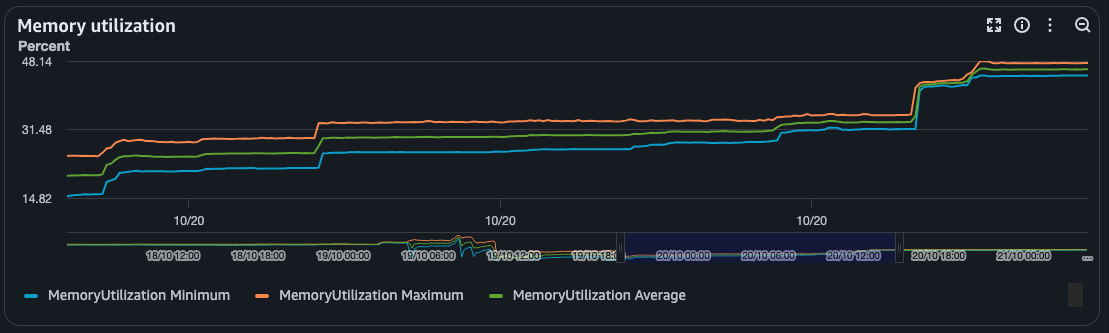
While this wasn’t necessarily new behaviour, it hadn’t really been problematic enough to deal with until recently. Generally our servers run with a fairly generous memory budget, and we deploy fairly often which resets any memory creep.
But in the past week, we actually started seeing issues with applications running out of memory and getting killed by the OOMKiller, leading to us dropping user requests.
Now, autoscaling restarts the server in-place fairly quickly, so the impact was limited, but still. Having production servers crash feels bad.
So if this memory creep had been around for a while, why was it a problem now when it hadn’t been before?
- Climatiq bundles a lot of static data inside its application. We load all of this data into memory at application startup (inside a rust
LazyLock). The amount of embedded data had kept rising, but we had not kept increasing our server memory, which means that the memory budget we actually had left at runtime had gotten smaller over time. - The server that got killed happened on a Monday, after multiple days without any releases, which means the memory had more time to creep up than normal.
When we noticed this, the first thing we did was just to increase the memory each server had to give ourselves a bit of breathing room.
But since memory ain’t cheap (you seen the price of RAM these days?) we also wanted to investigate and fix the root cause of this memory creep.
Reproducing the Problem
The first thing I did was attempt to see if I could reproduce the memory creep locally, so I had a chance to debug, and more importantly, see if any fixes I did worked.
Luckily we have a pretty comprehensive set of integration tests, so reproducing was fairly simple:
- I built a docker container that was identical to the one we served in production.1
- I then ran the entire test suite against it multiple times, giving the application a little bit of time between each round, to see if that helped.
- Then I read how much memory the application was using, or more specifically, the Resident Set Size (RSS), which is how much memory the operating system has allocated to the application, which might not be what the application actually uses - more on that later.
- I read this by reading the
VmRSSvalue inside the docker container from/proc/{pid}/status.
- I read this by reading the
Turns out yeah, I could reproduce this pretty easily under these circumstances.
This is the RSS over time:
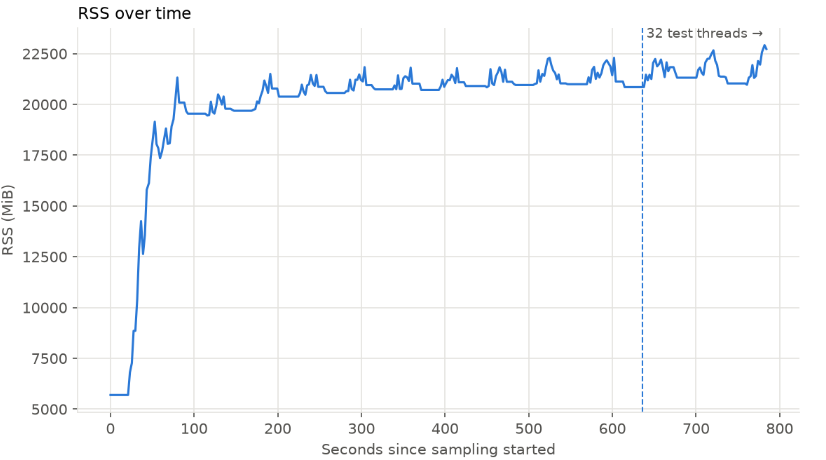
You can see at the start we allocate a lot of memory - that’s all the embedded data I mentioned.
Then when each round starts, memory usage peaks and then falls slightly as we enter the idle period, where some of the memory can be returned to the operating system.
But crucially, not all of the memory is returned. Each round it looks like we keep a little more memory.
If we zoom in on the RSS after each idle period, we can see that it keeps going up!
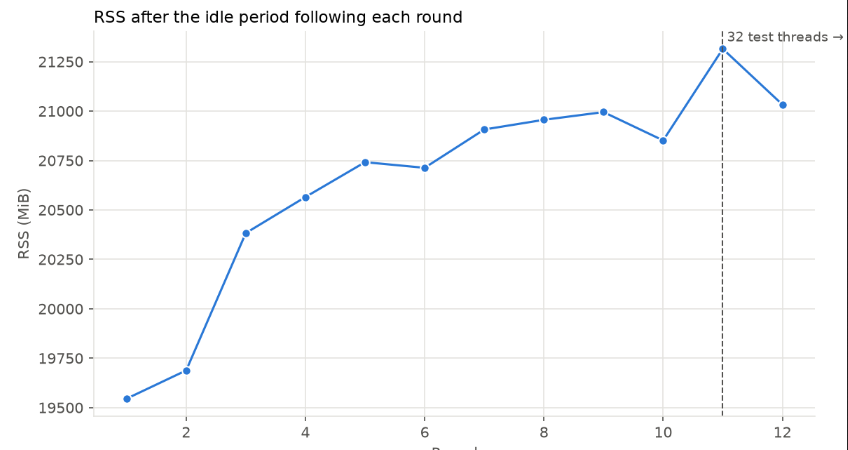
And while based on these numbers, I can’t guarantee that this memory growth is unbounded (i.e. it might stabilize at some point2), we can definitely see that we keep allocating more and more memory over time.
As a fun sidenote, this script was actually meant to run for 20 rounds, but my docker container got OOMKilled after 13 rounds, which also seems like a solid way of reproducing the issue.
How Applications Get Memory
Before we go further, let’s talk a bit more about how memory is allocated to applications, as we need to understand that before we can start looking into solutions.
Memory management is surprisingly complicated in modern operating systems, but we don’t need to dive super deep into it for this post. A simplified explanation of what we need to know is:
- An application requests memory from the operating system. E.g. it might say “I need to allocate 200MB, please give me some memory to do that.”
- The operating system will give the application some memory. It will not give it exactly the amount requested, but generally a little more. This is because for the operating system, memory is divided into buckets, called pages, which are often 4KiB. An operating system generally only allocates pages to an application, so if an application asks for 1KiB of additional memory, it will get at least 4KiB.
- Most applications allocate and free memory a lot, and going back to the operating system each time is generally fairly slow. Generally applications will allocate and deallocate memory without ever telling the operating system about it.
- The operating system generally comes into play in two cases:
- When the application needs to allocate more memory than what the operating system has already given it.
- When a page is completely free of any data, in which case the application can tell the operating system that it’s done with the page, and that it can be used for something else.
- The operating system generally comes into play in two cases:
The internal logic inside an application, for how it handles memory and when it talks to the operating system is called a “memory allocator”, or just “allocator” for short.
The distinction between how much memory an application is actually using, vs how much the operating system thinks it’s using is important.
Imagine the following sequence of events:
- An application needs 100MB to do some work and asks the operating system for it.
- The operating system gives the application at least 100MB, or a bit more depending on the page size.
- The operating system now thinks the application is using 100MB.
- The application uses 100MB to do some work. After it is done with the memory, it does not release it back to the operating system.
- This could be for multiple reasons:
- Perhaps because it thinks it will need it again soon, and keeping it is more effective than giving it back and having to re-ask for it.
- It might not be able to give it back - we’ll touch more on that later.
- This could be for multiple reasons:
Now, this also means that the operating system might not have a clear idea of how much memory an application is actually using. In this example, the operating system thinks the application is using 100MB, while it might be using significantly less in practice. The graphs you see at the top of the article are the operating system’s point of view.
The Usual Suspects
Armed with our new understanding of memory management and a reproduction case, let’s consider what kind of reasons our application could have for continuing to request more and more memory from the operating system.
- A memory leak. This is where your application allocates some memory, and for some reason never deallocates it.
- Climatiq is written in Rust which makes leaking memory by accident pretty hard (but not impossible). You can leak memory via explicitly calling
leak()or by having cyclical references inside anRcor anArc, but after investingating we found no likely suspects.
- Climatiq is written in Rust which makes leaking memory by accident pretty hard (but not impossible). You can leak memory via explicitly calling
- An application that simply uses more and more memory.
- Our application could potentially just allocate more and more memory while it’s running. As it’s an HTTP server, you would expect most of the memory we allocate to be freed after handling each request. However, we do have a persistent in-memory cache with a fairly long time-to-live, which was a candidate for memory growing unbounded.
- That for some reason, the application is unable to effectively reuse memory, and must continue to request more from the operating system.
- Essentially the case above, where the application keeps using the same amount of memory, but needs to keep requesting more memory from the operating system. This is generally known as Heap Fragmentation - we’ll dive into it this in a second.
So we’ve determined it’s not reason 1, and we have to figure out if it’s reason 2 or 3.
Heap Profiling
I wanted to see if I could get more of an intuition for how we actually used our memory, so I looked into using a heap profiler.
I’ve done plenty of CPU profiling, and localized memory profiling, but I’ve never actually needed to use a heap profiler before, so I figured this was my chance to play with a new toy.
And, turns out, it can be surprisingly hard to find a good heap profiler for MacOS, as most of them seem to work exclusively on Linux.
I also tried opening up dhat, which seems to be a rust reimplementation of the DHAT that comes with valgrind. However, it’s significantly slower, and after 20 minutes or so, my server still hadn’t actually started, and it was still allocating all the embedded data, so I gave up on dhat for this.
I ended up making cargo-instruments work. cargo-instruments allows you to run your binary with profiling that you can then later load in the “Instruments” app on MacOS. While cargo-instruments did work, it wasn’t easy to figure out how to use, and particularly for a server workflow, I had to dig into a few github issues to get it to working.
In the end I didn’t spend enough time on heap profiling to really start getting results. It confirmed that most of our allocations come from the embedded data, and nothing else really jumped out at me.
I would probably have come back to this more thoroughly, if another avenue hadn’t yielded results pretty fast.
Ghost Memory in The Machine
So realistically our two options for what happens here is that we stuff our cache so full of stuff that we see increased memory usage, or that for some reason we fail to reuse the memory we already have.
Luckily this was fairly easy to test - I could simply rerun the script from before that measured memory usage, but with the cache disabled. Practically same results. This means that we were probably looking at a case of heap fragmentation!
Heap fragmentation can happen when memory becomes “scattered” in a way that makes it hard to re-use. We can demonstrate with a really simple example:
Imagine a machine, where the operating system has two pages (marked in black). It has to give those out to a server when the server needs them.

During a request, a server does the following:
- Allocates a small and a large object. Both fit within one page, so the operating system just gives it one page.

- Deallocates the large object, as it’s not needed anymore

- Allocates a new smaller object. The allocator places it at the start of the page, where there is now free memory.

After handling this request, we now have one page, that’s got fragmented memory lying around!
This is all well and good, until we handle a new request. If that has the same exact memory pattern, we don’t have anywhere to put the large allocation, and we need to request a new page from the operating system!
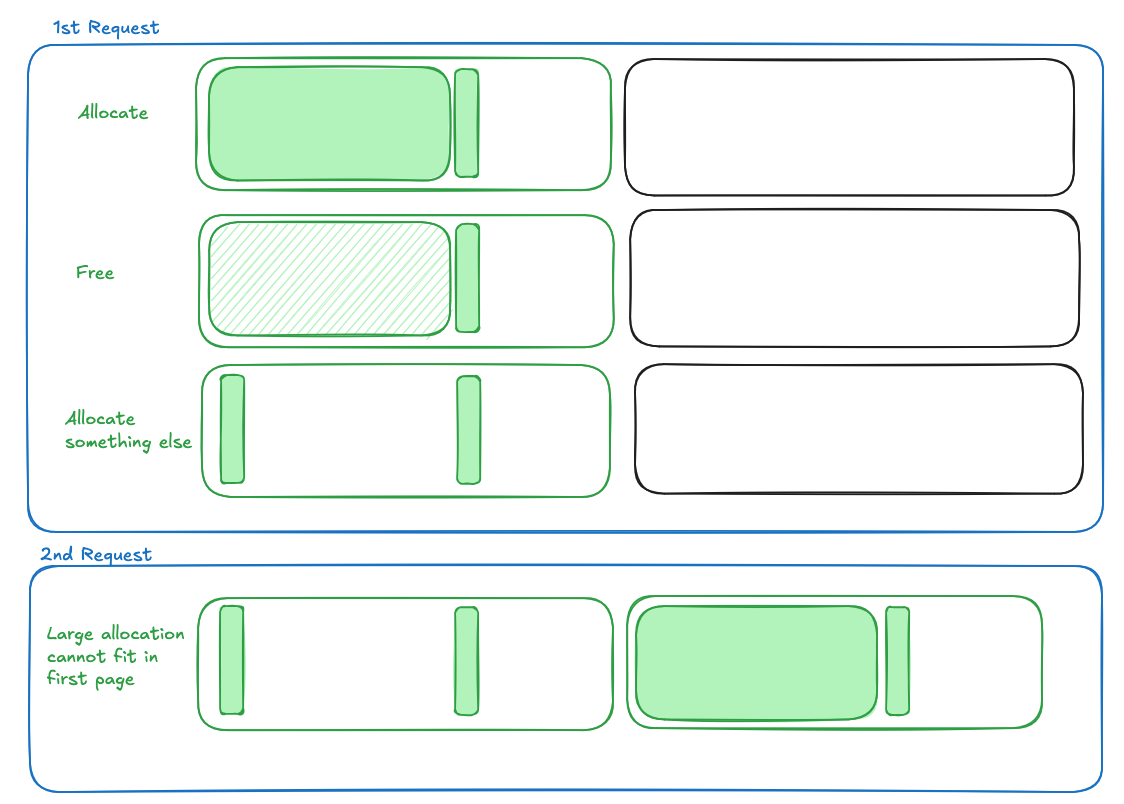
Now imagine this happens on each request. We’ll continuously need to request more and more memory from the operating system, even if we don’t really use most of it.3
You Had Me At Jello Jemallocator
The standard allocator we use in production was the one in glibc, which I believe is generally not regarded as the best implementation for concurrent multi-threaded programs.
This is because as a performance optimization, malloc splits the memory it manages up into “arenas”, which is a large chunk of memory. Each thread is assigned one arena, which it (mostly) reads and writes from.
This means that we could run into cases where our application has free memory in some arenas, but the thread we’re currently on is assigned to an arena without free memory, in which case we’d still need to request more from the operating system.
In Climatiq, we use a tokio spawn_blocking thread-pool, where each thread serves one request. Having many threads potentially means more arenas,4 which might make this problem worse.
An alternative allocator to the one in glibc is jemalloc, which is specifically designed to be effective when multi-threading and to reduce heap fragmentation.
As an intuition for how a good allocator can reduce heap fragmentation: Imagine if in the example above, the second small block was allocated right after to the first small block.
It would then take significantly longer before we’d need to request a new page from the operating system.
Switching the global allocator in Rust is pretty easy, it’s a couple of lines of code, and the results are pretty darn good.
Here is the glibc malloc contrasted with jemalloc.
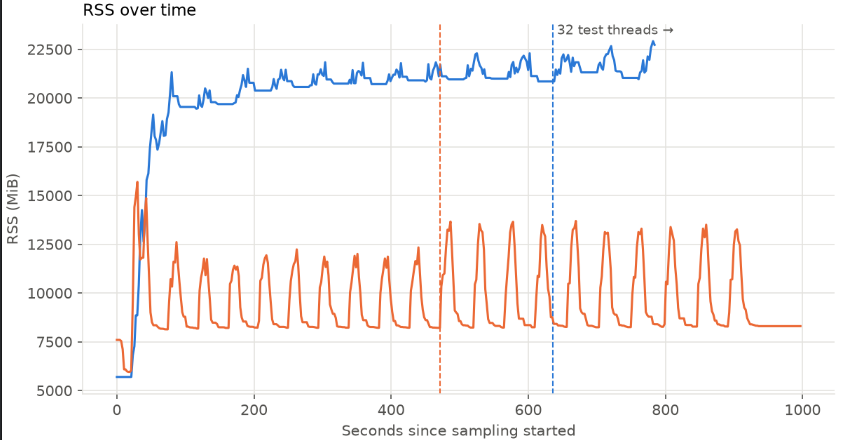
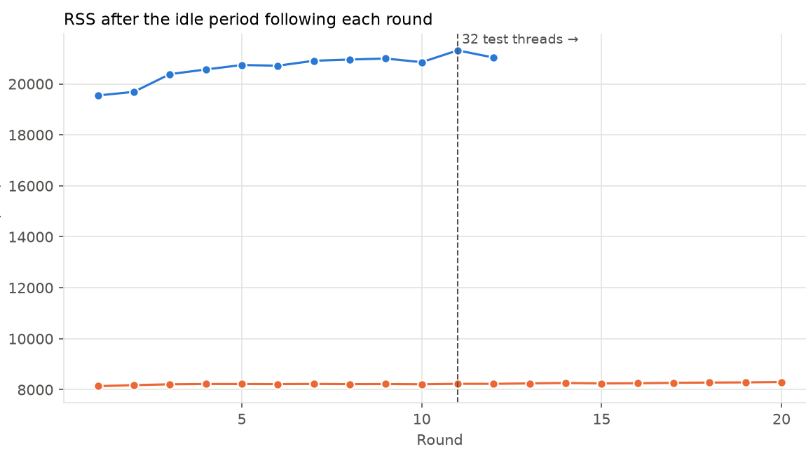
Significantly lower memory allocated, and the RSS doesn’t go up after each round. It also seems to allocate significantly less memory here, but the magnitude isn’t quite what we see in production5.
However, what we do see, in this admittedly noisy graph, is that memory continuously goes up when the application is running,
but after the marked date (the purple text), the pattern evens out, and we don’t see continuous spikes.
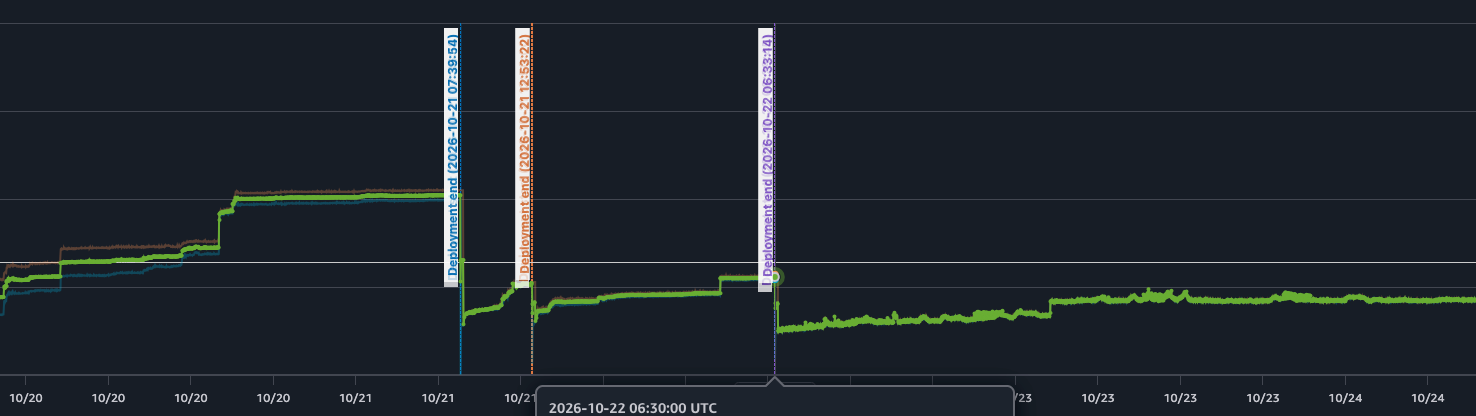 When the memory goes down, it's generally due to a new release, so the trend is a bit hard to see.
So if you’re seeing memory creep - try switching your allocator!
-
I needed the exact reproduction of environment, because the memory allocator on MacOS which I run locally, acts very differently to the default allocator on our production environment. ↩
-
I actually originally expect that the amount of parallel threads would matter much for contention, and that the additional memory would be MAX_THREADS * SOME_OVERHEAD, which is why you see the graphs talk about 16 or 32 threads - that’s the parallelism we ran the test suite with. However, there didn’t seem to be a super clear correlation. ↩
-
Obviously this pattern only holds, if we actually don’t end up deallocating the small object after each request, consider it more as an example. ↩
-
I believe on 64 bit machines, arenas are capped at 8x the amount of cores. ↩
-
I think in production AWS and Docker uses cgroups memory limits, which differs a bit - but directionally they should be the same. ↩

I'm Gustav (Mastodon), I'm currently a Staff Engineer at Climatiq, where we provide an API for all sorts of carbon emission accounting. I currently work mostly with Rust, but I've worked extensively with C#, Node, React, React Native, Typescript and Django.
All content on this website is written by a human. See the AI policy.
See an error? Submit a Pull Request and help fix it!
Back to the front page?